DJI Osmo Mobile 8P – Intelligent Smartphone Gimbal for Video, Vlogging and Content Creation
The DJI Osmo Mobile 8P is an advanced smartphone gimbal designed for creators who want smoother, more controlled and better-composed mobile videos. With ActiveTrack 8.0, Osmo FrameTap, a built-in extension rod, an integrated tripod and creative DJI Mimo features, it is a strong choice for vlogging, social media content, travel videos, family moments, events and live streaming.
Its main purpose is to make mobile filmmaking more stable, intuitive and flexible. Intelligent tracking keeps your subject in frame, advanced stabilization reduces shake, and the built-in tools help you work faster whether you are filming at home, outdoors or on location.
Key Benefits
- ActiveTrack 8.0 for more reliable subject tracking
- Osmo FrameTap with screen mirroring and intuitive control
- Subject tracking for people, pets, objects and vehicles
- Built-in extension rod for creative angles and wider compositions
- Integrated tripod for vlogs, live streaming and hands-free shooting
- 360° infinite pan rotation for panoramas and dynamic footage
- Up to 10 hours of battery life for longer shooting sessions
- USB-C phone charging support for outdoor recording and streaming
- DJI Mimo app with creative modes, ShotGuides and AI-assisted editing
- Smooth gimbal control for natural camera movement
Osmo FrameTap – Composition and Control in Your Hand
The new Osmo FrameTap mirrors the image from your smartphone or the second-generation DJI OM Multifunctional Module. This is useful when shooting selfies with the rear camera or when setting up shots from a distance.
It helps keep your framing clean, controlled and easy to adjust.
- Live view mirroring for easier framing
- Tap-to-track control using subject detection boxes
- Quick switching between detected subjects
- Remote composition control for selfies, vlogs and tripod shots
- Magnetic attachment for fast mounting and removal
Adjustable Lighting with the Multifunctional Module
The second-generation DJI OM Multifunctional Module includes a built-in fill light, which can also be controlled through Osmo FrameTap. This is useful for portraits, vlogs, live streaming and low-light recording.
- 8 brightness levels
- 8 color temperature settings
- More natural portrait lighting
- Useful for indoor and evening video
- Direct control via Osmo FrameTap
Advanced Tracking for Different Subjects
ActiveTrack 8.0 is designed to keep your subject in frame while it moves. The DJI Osmo Mobile 8P can help maintain tracking in crowded locations, fast-paced scenes and more complex shooting situations.
With the second-generation Multifunctional Module, the gimbal can track people, cats, dogs, objects and vehicles. This is useful for product videos, car content, family videos, sports, pets and event coverage.
- People tracking
- Cat and dog tracking
- Manual object tracking
- Vehicle tracking
- Fast switching between subjects
- Keeps moving subjects centered
- Useful for sports, dance, vlogs and events
Apple DockKit Support for Faster Setup
Apple DockKit support makes setup easier with compatible iPhone models. By tapping the phone to the NFC area on the gimbal, Bluetooth pairing can be started quickly. Once the magnetic mount is attached, tracking and recording can begin.
- Fast Bluetooth pairing
- Compatible with supported iPhone models
- Magnetic mounting
- Quick start for spontaneous recording
- Convenient for mobile content creators
Built-In Extension Rod and Tripod
The built-in extension rod helps create wider compositions, group selfies, travel vlogs and more creative high or low-angle shots. The integrated tripod provides a stable setup for vlogs, time-lapse recording and live streaming without needing an extra accessory.
- Up to 215 mm extension rod
- Wider framing for selfies and vlogs
- Creative high and low angles
- Integrated tripod for stable surfaces
- Easier hands-free recording
- Fewer separate accessories to carry
Stabilization for Mobile Video
The DJI Osmo Mobile 8P uses advanced 8th-generation stabilization to help create smoother and more balanced mobile footage. This is especially useful for walking vlogs, event videos, travel content and action-oriented scenes.
- Advanced gimbal stabilization
- Reduced handheld shake
- Balanced camera movement
- Support for low-angle shooting
- Dynamic motion recording
- Smoother smartphone videos
Gimbal Modes for Different Shooting Styles
The Osmo Mobile 8P offers several modes, allowing the camera movement to match the scene and creative intent more precisely.
- PTF mode: follows pan and tilt movements while staying stable during roll
- FPV mode: all three axes follow the gimbal movement for a more dynamic look
- PF mode: follows pan movement only, ideal for horizontal movement
- SpinShot: creates rotating camera moves and dynamic push-pull shots
- 360° infinite rotation: useful for panoramas and rotating video shots
- Low-angle shooting: supports creative ground-level perspectives
Creative DJI Mimo Features
The DJI Mimo app provides multiple creative modes and editing tools. These features are useful when you want polished results quickly, without complex post-production.
- Gesture control
- Composition Assist with Golden Ratio overlay
- Built-in filters
- LUT import support
- Real-time preview
- AI-assisted one-tap editing
- Exclusive video templates
- ShotGuides with automatic scene analysis
- DynamicZoom
- 35:1 widescreen recording
- Slow shutter for creative light effects
- Action recording for fast movement
Who Is the DJI Osmo Mobile 8P For?
The DJI Osmo Mobile 8P is designed for users who want to create smoother, more intentional and more creative videos with a smartphone. It is suitable for beginners, advanced vloggers and anyone looking for a versatile mobile video tool.
- Vloggers and content creators
- YouTube, TikTok and Instagram videos
- Travel videos and family moments
- Live streaming
- Sports, dance and action scenes
- Product videos and educational content
- Creative mobile filmmaking
- Beginner and advanced smartphone videographers
DJI Osmo Mobile 8P and Mobile Video Gear at Fotoplus
At Fotoplus, you can find a wide range of DJI gimbals, mobile video tools, microphones, lights, tripods and content creator accessories. If you are unsure whether the DJI Osmo Mobile 8P or another Osmo Mobile model fits your workflow better, expert support can help you choose the right setup.
Why Choose Fotoplus?
- Expert support for choosing mobile video equipment
- DJI products and accessories available in one place
- Photo and video specialist retail background
- Online ordering and in-store pickup
- Tools for content creators, including microphones, lights and tripods
- Practical product advice based on real-world use
Explore the DJI Osmo Mobile 8P at Fotoplus and choose the right microphone, light or accessory for smoother and more professional-looking mobile videos.

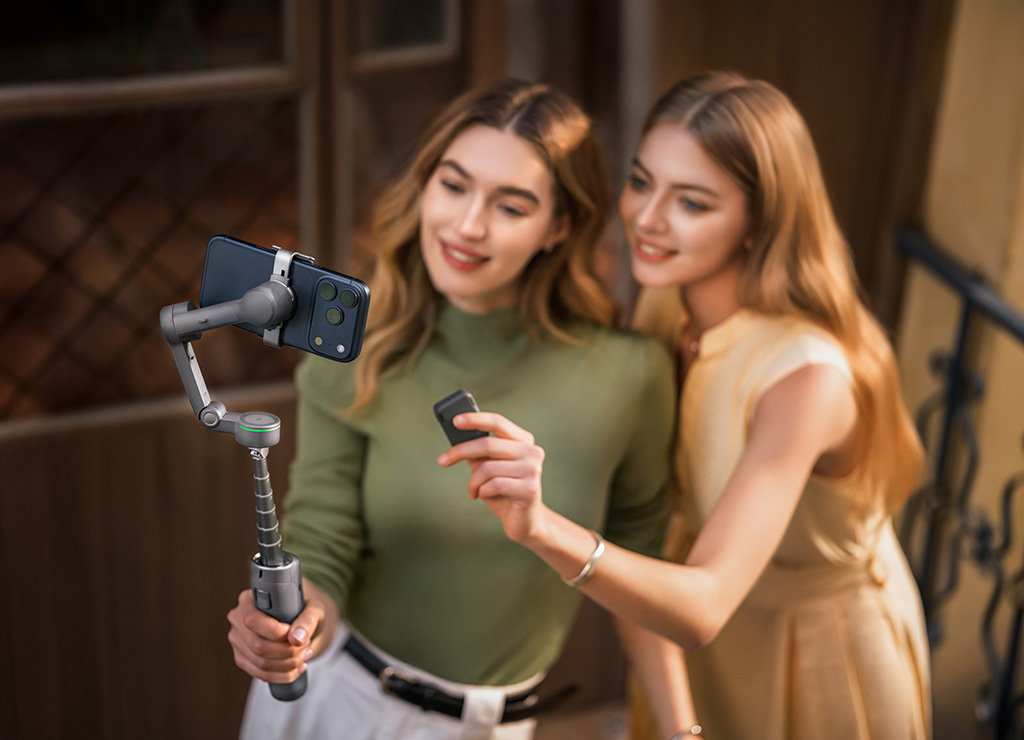
Composition in the Palm of Your Hand
The new Osmo FrameTap mirrors the image from your mobile phone or the second-generation multifunctional module [6]. Whether you are taking a selfie with the rear camera or setting up a remote shot, your composition stays precise and control remains in your hands.
Tap to Track [17]
The remote screen automatically frames subjects with recognition boxes. Simply tap the frame to focus and start tracking [17]. You can easily switch between different subjects by tapping the recognition boxes [17]. It is intuitive and responds instantly.
Adjust the Lighting
Adjust the fill light of the second-generation multifunctional module [6] directly with Osmo FrameTap. Eight brightness levels and eight color temperature settings let you fine-tune the lighting for any environment, helping you create natural, bright portraits.
Intuitive Joystick Control
Control gimbal movement, zoom, and the fill light of the second-generation multifunctional module [6] with your thumb. The gearless design provides smooth, precise response for natural camera movements and professional-looking footage.
Quick Attachment and Removal
Attach or remove the remote controller in seconds. Use it on the handle for one-handed filming, or detach it for more flexible compositions. The magnetic design allows instant connection and secure mounting, ensuring smooth operation in any situation.
Enhanced Tracking for Every Subject
Tracks Everything [7]
The new second-generation multifunctional module [6] can track not only people, cats, and dogs, but also virtually any object [3]. Whether it is a collector’s item, an elegant car, or a landmark, Osmo Mobile 8P keeps everything centered. Highlight your subject or shift focus whenever the story calls for it.
Lightning-Fast Start with Apple DockKit [4]
Apple DockKit Support
Start filming the moment inspiration strikes. Simply tap your phone [4] against the NFC area of the gimbal to pair via Bluetooth. Once the magnetic mount is connected, smooth tracking is ready to begin.
ActiveTrack 8.0 [2], Always in Focus
ActiveTrack 8.0 [2] takes lens focusing performance to a new level. Step into a crowded concert, a busy exhibition, or an intense sports arena. Even there, your subject remains continuously centered [1]. It handles obstacles and fast movements with ease, keeping the subject in frame at all times.
Intelligent, Reliable Tracking
Wherever you go, the camera follows. Osmo Mobile 8P adapts to a wide range of shooting locations and keeps your subject in focus.
Subject Tracking
No matter how you move or change direction, the gimbal automatically detects and follows your movement, keeping focus consistently on you. Create impressive, attention-grabbing shots with ease.
Dual Lens Boost
Wide-angle and telephoto lenses work together to track fast-moving subjects across a larger area [8]. The Mimo app can even automatically bring the subject back into the shot if they move out of frame. Whether it is skateboarding or basketball, you can capture the action easily, steadily, and in every exciting moment.
Integrated Design, Ready to Create
Osmo Mobile 8P features a built-in extension rod and tripod for instant versatility. With the second-generation multifunctional module [6], a practical fill light is also available.
Fill Light
The fill light of the second-generation multifunctional module [6] offers eight brightness levels and eight color temperature settings. Whether you are shooting on a rainy day or live streaming in low light, you can create the right look and mood.
Built-in Extension Rod
The built-in extension rod expands your field of view, allowing more friends, pets, or impressive landscapes to fit into every selfie. When creating vlogs, your videos can also become richer and more visually engaging thanks to high-angle and low-angle shots.
Built-in Tripod
The tripod is built directly into the handle, so there is no extra load to carry. With its updated design, it opens wider for greater stability on a variety of surfaces [9], allowing you to set up and shoot with confidence.
Full Power for Every Moment
Osmo Mobile 8P is designed for durability, with a battery life of up to 10 hours [5], supporting all-day shooting and creative work. Its USB-C port can also charge your phone, making it ideal for longer outdoor filming sessions and live streaming.
Masterful Mobile Movement
Next-generation stabilization provides a solid foundation, while intuitive modes offer creative freedom. Together, they make it possible to create smooth, well-composed footage.
Enhanced Stabilization
The 8th-generation stabilizer, with increased motor power, elevates both everyday shooting and professional creative work. Whether you are shooting from a low angle or changing perspective, Osmo Mobile 8P helps deliver balanced footage.
PTF
In PTF mode, the camera view follows the gimbal’s pan and tilt movements while remaining stable during rolls. This mode is well suited for upward, downward, and diagonal shooting.
FPV
In FPV mode, all three axes of the gimbal follow the movement of the main body. This is especially useful for dynamic filming of stationary subjects such as landmarks, buildings, or sculptures.
PF
The camera view follows only the gimbal’s panning movement and remains stable during tilts and rolls. This is ideal for horizontal shots or moving around a subject.
SpinShot
Push the joystick left or right to control the rotation of the camera view and create dynamic footage. This mode is ideal for capturing push-in, pull-out, and high-angle movements.
Creative Modes, Cinematic Effects
Add creativity to your captured memories. The Mimo app offers a range of cinematic modes that can turn even simple actions into professional-looking effects.
360° Infinite Rotation
The pan axis of Osmo Mobile 8P enables unlimited 360° horizontal rotation, allowing you to freely capture smooth panoramic photos and videos from any angle. Combined with intelligent tracking, the gimbal can continuously focus on moving subjects, delivering smooth, professional-quality footage.
Low-Angle Shots
Tilt the pan axis forward for low-angle shots and discover a new creative perspective. With the second-generation multifunctional module [6], the gimbal can also automatically track children, cats, dogs, and other subjects [3], allowing you to capture their charm from their own point of view.
Slow Shutter Speed
Capture the path of light and create dreamlike, surreal images where stillness and motion blend together. This mode performs especially well at night and in low-light conditions, making light painting and more artistic creations possible.
Action Shot
Track fast movement. Draw a frame around athletes or dancers, and the gimbal responds quickly to keep them in frame, preserving the flow of energetic motion.
DynamicZoom
Use Move In and Move Out modes to create stretched or compressed visual effects, helping you produce dynamic and impactful shots directly on your phone.
Widescreen Shot
Record directly in the classic 2.35:1 format and give everyday footage an instant cinematic look. By achieving this widescreen effect directly in camera, you can add a professional-level texture to the footage without the need for cropping in post-production.
Get Started Easily with DJI Mimo
Gesture Control
Enable gesture control in the Mimo app and select the Follow & Shoot setting. You can then activate ActiveTrack and start recording with a “V” or “Palm” gesture [16].
Composition Assist
In ActiveTrack mode, enable Composition Assist and use the Golden Ratio overlay to help frame your shot. This helps keep your subject perfectly balanced and creates a more professional look.
Built-in Filters
Enhance colors with themes such as Retrofilm, Gourmet, or Portrait. Supported LUT import and real-time preview allow you to create your own style in seconds.
One-Tap Editing
The DJI Mimo app supports AI-powered one-tap editing, along with a range of exclusive video templates. It includes practical tools designed to make content creation easier for new creators.
ShotGuides
ShotGuides automatically analyzes the scene and recommends a shooting sequence. It also provides step-by-step guidance on what to do. Choose from different templates, follow the instructions, and create professional-looking shots in just a few moments.
* Data was collected in a controlled environment. Actual experience may differ from the information above. For details, please refer to the corresponding product page on DJI’s official website.
- Tracking continuity may be affected by strongly colored lighting, which may obscure the subject’s colors, or by multiple subjects with a substantially similar appearance.
- ActiveTrack 8.0 is available only in the DJI Mimo app and currently works only with selected iPhone models. For more information, please refer to the list of compatible smartphones on the official product page.
- Subject tracking using the second-generation multifunctional module, excluding people, animals, and vehicles: the frame must be selected manually. The effective range varies depending on the size of the object. The object must have clearly defined outlines, sufficient contrast from the background, and must occupy at least 10% of the frame.
- For compatibility information, please refer to DJI’s official website.
- Measured with the gimbal balanced, horizontal, and stationary, using only the remote controller, Osmo FrameTap, without any other accessories. During testing, the remote controller was detached from the gimbal for 4 hours, with Bluetooth connected and no operation performed, then attached to the gimbal for 6 hours.
- The second-generation DJI OM Multifunctional Module features a built-in fill light. It is not included in the Osmo Mobile 8P Standard Combo package and is sold separately.
- The second-generation DJI OM Multifunctional Module supports tracking of people, cats, dogs, objects, and vehicles. Subject tracking using the second-generation multifunctional module, excluding people, animals, and vehicles: the frame must be selected manually. The effective range varies depending on the size of the object. The object must have clearly defined outlines, sufficient contrast from the background, and must occupy at least 10% of the frame.
- Available only for iPhone 13 Pro, iPhone 13 Pro Max, and newer Pro and Pro Max models.
- The built-in tripod should be used on stable, level surfaces in windless conditions.
- Sold separately. Supports only iPhone 12 and newer models. Compatible with official Apple MagSafe iPhone cases, allowing easy use without removing the case.
- DJI Mic Mini 2 is not included in some packages and is sold separately.
- Sold separately.
- Currently, only Apple Watch is supported. For compatible Apple Watch models and app usage instructions, please refer to the FAQ.
- The weight of Osmo Mobile 8P includes the gimbal, built-in tripod, fifth-generation magnetic phone clamp, second-generation multifunctional module, and Osmo FrameTap. The weight of Osmo Mobile 8 / Osmo Mobile 7P includes the gimbal, built-in tripod, magnetic phone clamp, and multifunctional module. The weight of Osmo Mobile 7 includes the gimbal, built-in tripod, and magnetic phone clamp. Actual weight may vary slightly. For exact details, please refer to the final delivered product.
- Measurement was performed in horizontal and portrait orientation with the gimbal balanced and without additional accessories.
- For ActiveTrack gesture control, the user must face the camera from a distance of 0.5–4 m and hold the gesture for 1–2 seconds. The Mimo app detects the gesture and starts tracking the person closest to it.
- This function is available only when the image from the second-generation DJI OM Multifunctional Module is mirrored to Osmo FrameTap.
In The Box
Osmo Mobile 8P
DJI OM Magnetic Phone Clamp 5
DJI OM Multifunctional Module 2
Osmo FrameTap
Power Cable (USB-C to USB-C, 50 cm)
Phone Charging Cable (USB-C to USB-C, 15 cm)
Storage Pouch
Quick Start Guide
Safety Guidelines
DJI Store Promotion Card
DJI Logo Sticker



